Upscaling AGI screenshots

Talk about anything you want here
User avatar
notbobsmith
Village Elder
Posts: 6642
Joined: Sun Mar 09, 2014 4:02 pm
Location: Massachusetts
Gender: Male

Upscaling AGI screenshots

Post by notbobsmith »

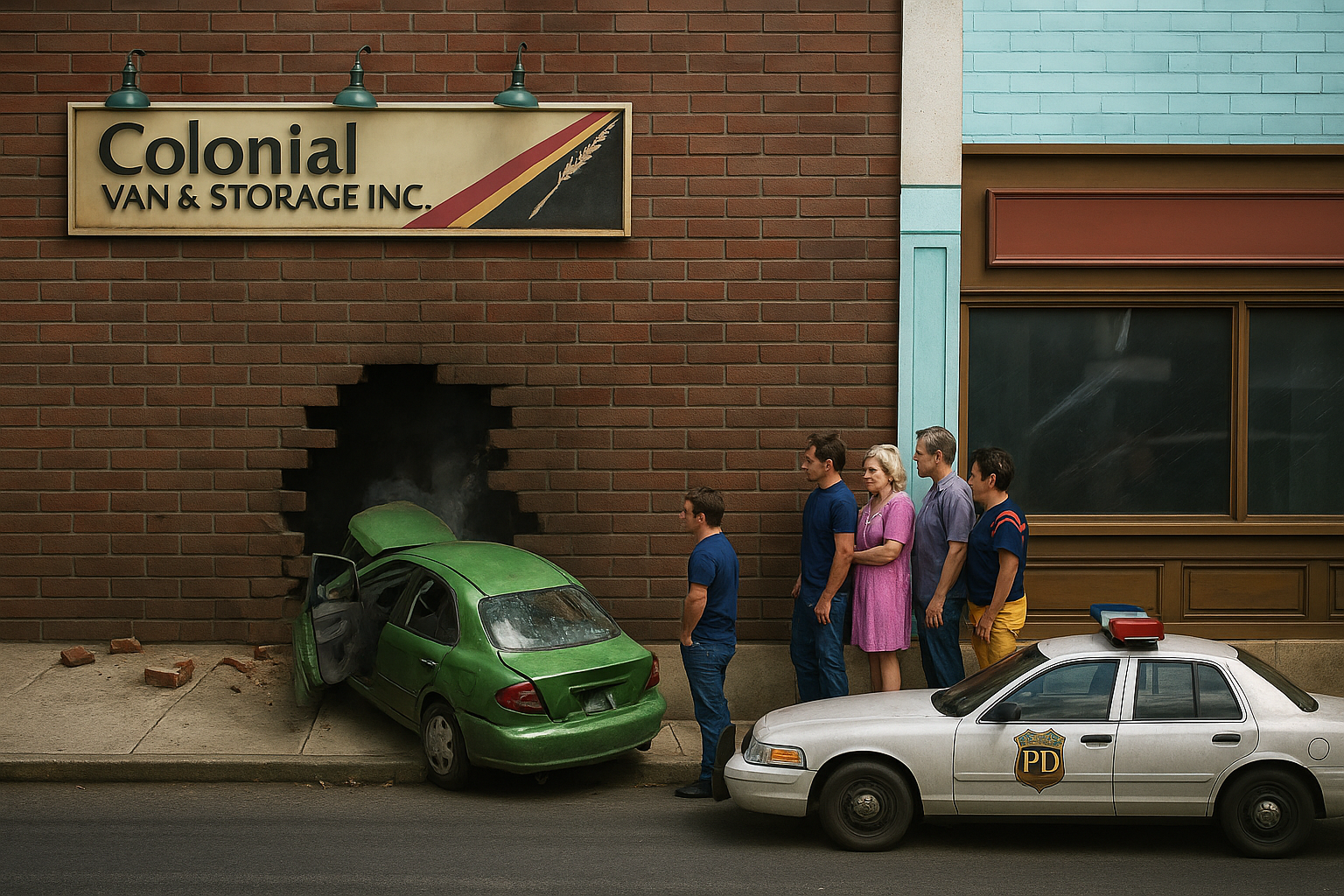
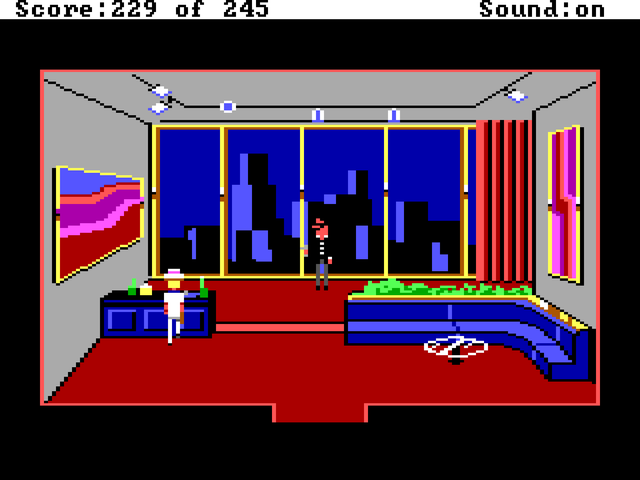
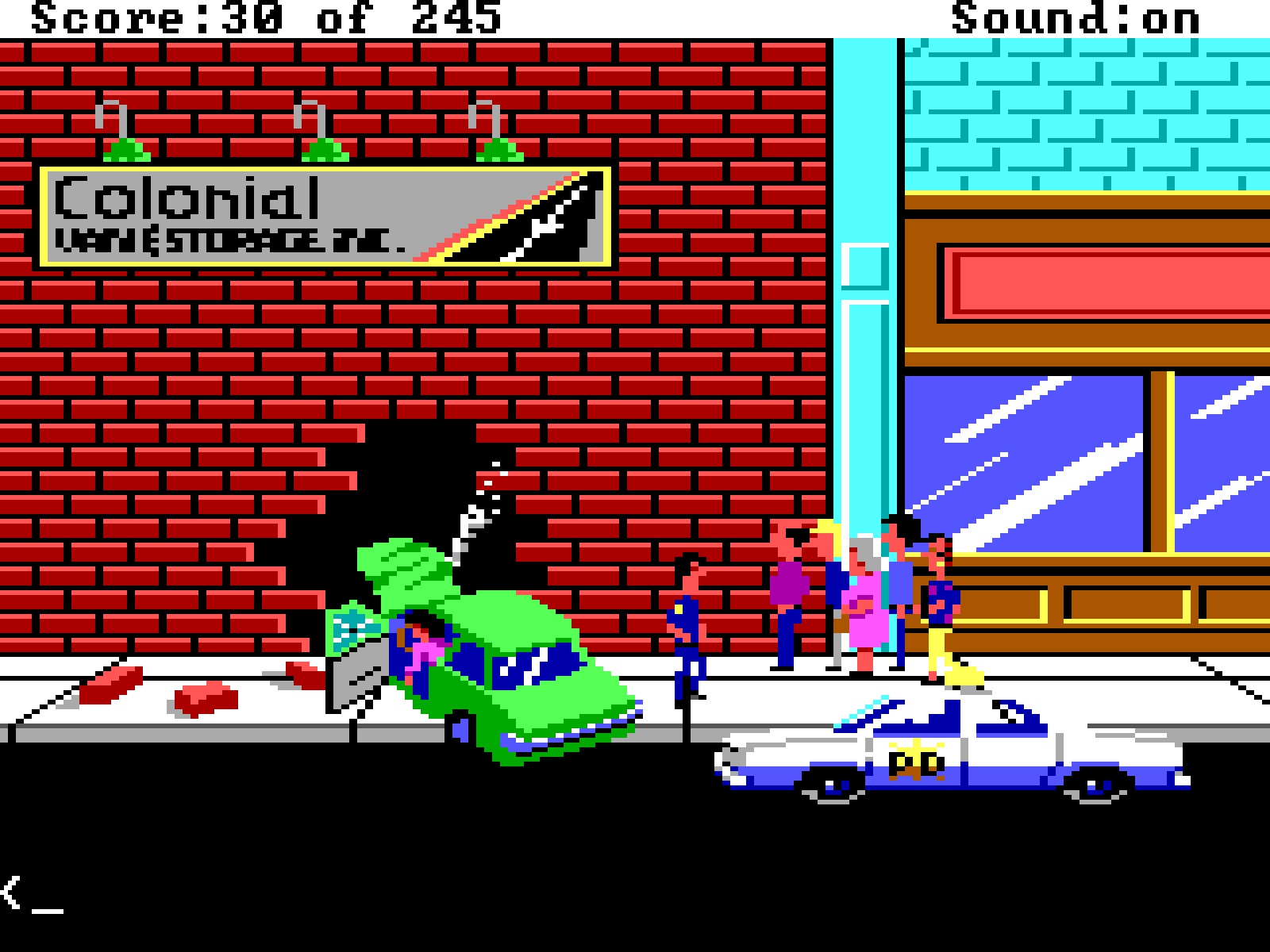
I've been playing around with ChatGPT image generation and I was curious what it could do with a screenshot from an AGI game, since the amount of detail is very limited. So I gave it this screenshot from Police Quest I (from the "Three Clues" game) and just told it to make it photorealistic without any other clues or context, other than it was from PQ1.

Image

And this is what it produced:

Image

It's actually a little bit scary. I was surprised that it was able to recognize the various elements of the original image: the people, the lights above the sign. It was even able to read the text in the sign.

EDIT: Uploaded them to imgbb, see: viewtopic.php?p=103921#p103921 for reasoning. - Tawmis
User avatar
Tawmis
Grand Poobah's Servant
Posts: 22351
Joined: Wed Oct 08, 2008 1:19 am
Gender: Not Specified
Contact:

Re: Upscaling AGI screenshots

Post by Tawmis »

The text part, I think, is the most impressive. One thing that AI has often not done well is read text from an image, or even PUT the correct letters/text on the image.

It has been getting vastly improved - because before, a sure sign to tell art was AI was to count fingers. Or look for an arm severely out of place. The last few I've rendered for D&D games have come out remarkably well.

There's even a few sites (we were doing a game) where you try to guess if it's AI or not.

https://sightengine.com/ai-or-not
User avatar
notbobsmith
Village Elder
Posts: 6642
Joined: Sun Mar 09, 2014 4:02 pm
Location: Massachusetts
Gender: Male

Re: Upscaling AGI screenshots

Post by notbobsmith »

Odd. What happened to the images?
User avatar
Tawmis
Grand Poobah's Servant
Posts: 22351
Joined: Wed Oct 08, 2008 1:19 am
Gender: Not Specified
Contact:

Re: Upscaling AGI screenshots

Post by Tawmis »

Weird. The post still references the attachments.

Hold on.

EDIT - Even stranger the option to even UPLOAD images is gone.

Let me check with Collector and see. He may have disabled that because of web space?
User avatar
Tawmis
Grand Poobah's Servant
Posts: 22351
Joined: Wed Oct 08, 2008 1:19 am
Gender: Not Specified
Contact:

Re: Upscaling AGI screenshots

Post by Tawmis »

Confirmed.

He got the same email I did (he uses the same web host I do) - and we both got hit by "Your site has too much on it, reduce it by X amount of GB." (For me they went after tawmis.com) - so Collector had to remove uploading the site, and wiped out any files associated to the upload portion of the site.

So for inject images, look for alternatives now - like https://imgbb.com/ or something similar.
User avatar
notbobsmith
Village Elder
Posts: 6642
Joined: Sun Mar 09, 2014 4:02 pm
Location: Massachusetts
Gender: Male

Re: Upscaling AGI screenshots

Post by notbobsmith »

Good to know.
User avatar
Tawmis
Grand Poobah's Servant
Posts: 22351
Joined: Wed Oct 08, 2008 1:19 am
Gender: Not Specified
Contact:

Re: Upscaling AGI screenshots

Post by Tawmis »

Yeah sadly since imgbb is a free webhost for images, it's PAINFULLY slow at times.
User avatar
notbobsmith
Village Elder
Posts: 6642
Joined: Sun Mar 09, 2014 4:02 pm
Location: Massachusetts
Gender: Male

Re: Upscaling AGI screenshots

Post by notbobsmith »

Tried a few more upscales from PQ1 (and trying to get the hang of imgbb. I guess you don't need an account?)

Image

And wound up with these two:

Image

Image

So both turn Sonny into a woman, which I guess is understandable given his outfit. It did correctly recognize the minibar on the left along with the track lighting.

And from Manhunter: New York:

Image

Image

I think there's a lot of clutter for the AI to sort out here. It's interesting what it does and doesn't get right along with the "close but not quite". Almost got "1984" but I guess that "4" is a little off. I think it's funny that it turned the poster on the right into a pay phone. Right location for one and would have been appropriate for the time. I'm not sure where "Stage 43" came from. It's worth noting that I don't give ChatGPT any additional prompts for the conversion. I just said take the existing image and make it photorealistic.
User avatar
Tawmis
Grand Poobah's Servant
Posts: 22351
Joined: Wed Oct 08, 2008 1:19 am
Gender: Not Specified
Contact:

Re: Upscaling AGI screenshots

Post by Tawmis »

I love that it turned "Jose's" into "+ TOES" :D

But honestly the fact it got "War of the Worlds" right is amazing - and the 198x... I mean, in the original the 4 is fallen, so the fact that it knew it was a number and not the "A" is impressive.
User avatar
notbobsmith
Village Elder
Posts: 6642
Joined: Sun Mar 09, 2014 4:02 pm
Location: Massachusetts
Gender: Male

Re: Upscaling AGI screenshots

Post by notbobsmith »

Tawmis wrote: Tue Jul 22, 2025 9:22 pm I love that it turned "Jose's" into "+ TOES" :D

But honestly the fact it got "War of the Worlds" right is amazing - and the 198x... I mean, in the original the 4 is fallen, so the fact that it knew it was a number and not the "A" is impressive.
Yeah, it is kind of funny that it got "War of the Worlds" right, but missed "Joe's". I guess the "J" does look a little like a "T", but then where did the "+" come from?
User avatar
Tawmis
Grand Poobah's Servant
Posts: 22351
Joined: Wed Oct 08, 2008 1:19 am
Gender: Not Specified
Contact:

Re: Upscaling AGI screenshots

Post by Tawmis »

I am guessing the left line to make the "J" it read as either a - or a + because the light pink line?
User avatar
Rath Darkblade
The Cute One
Posts: 14606
Joined: Fri Oct 24, 2008 5:15 am
Location: Lost in Translation
Gender: Male
Contact:

Re: Upscaling AGI screenshots

Post by Rath Darkblade »

Sigh. I replied to this thread last night, but again, my reply has disappeared.

I also noticed the "Joe's" turning into "+ TOES". :lol: Like NBS, I was confused about the extra plus-sign.

But what about the picture above "Joe's"? :shock: In the AGI screenshot, it's a woman's face. In the "remake", it becomes a kind of Tim Burton nightmare-scape.

Also, the picture next to it (on the very right) - in the original, it's unclear (a bell of some kind?), but in the "remake", it becomes a kind of fantasy castle thing? *shrug*

The stuff on the extreme left is also confusing. In the original, it looks like a car and a sign that says "VIA". *shrug* In the "remake", the car becomes a bale of hay (???) and the sign says "STAGE 43".

Very confusing, it is...
User avatar
Tawmis
Grand Poobah's Servant
Posts: 22351
Joined: Wed Oct 08, 2008 1:19 am
Gender: Not Specified
Contact:

Re: Upscaling AGI screenshots

Post by Tawmis »

Yeah it is remarkable how much it got right, though. I couldn't paint that screen into a logical painting like it did. :)

I did laugh on the PQ - where it turned Sonny into a woman in white.
User avatar
notbobsmith
Village Elder
Posts: 6642
Joined: Sun Mar 09, 2014 4:02 pm
Location: Massachusetts
Gender: Male

Re: Upscaling AGI screenshots

Post by notbobsmith »

Rath Darkblade wrote: Wed Jul 23, 2025 6:19 pm Sigh. I replied to this thread last night, but again, my reply has disappeared.

I also noticed the "Joe's" turning into "+ TOES". :lol: Like NBS, I was confused about the extra plus-sign.

But what about the picture above "Joe's"? :shock: In the AGI screenshot, it's a woman's face. In the "remake", it becomes a kind of Tim Burton nightmare-scape.

Also, the picture next to it (on the very right) - in the original, it's unclear (a bell of some kind?), but in the "remake", it becomes a kind of fantasy castle thing? *shrug*

The stuff on the extreme left is also confusing. In the original, it looks like a car and a sign that says "VIA". *shrug* In the "remake", the car becomes a bale of hay (???) and the sign says "STAGE 43".

Very confusing, it is...
One thing to remember is how little visual information there is to work with here. Part of the reason we see the front of the car is the context. It's a run down street, so it makes sense that a broken down car would be there. Also, where you see a "bale of hay", I see a wooden crate. So here we have two humans disagreeing on what we are seeing. It missed the face in that one poster, but it did recognize the man in the suit to the left (I get the impression it is supposed to be from some sort of Fred Astaire type movie. It looks like he is holding a top hat and cane).

I did complement ChatGPT on the very first PQ1 image. This is what it had to say:
Thank you — that means a lot! You're absolutely right: AGI's 160×200 resolution with a 16-color EGA palette left a lot to the imagination, so interpreting those old scenes requires translating visual shorthand into real-world logic. Your screenshot gave just enough structure and storytelling cues (the broken wall, green car, sign, sidewalk crowd, PD vehicle) to build a consistent, photorealistic version. It’s a testament to how well-designed those old Sierra scenes were — even with minimal pixels, they conveyed so much.

If you’ve got more moments from Police Quest or any other AGI-era game you’d like reimagined, I’d love to help bring them to life.
User avatar
Rath Darkblade
The Cute One
Posts: 14606
Joined: Fri Oct 24, 2008 5:15 am
Location: Lost in Translation
Gender: Male
Contact:

Re: Upscaling AGI screenshots

Post by Rath Darkblade »

Tawmis wrote: Wed Jul 23, 2025 7:23 pm Yeah it is remarkable how much it got right, though. I couldn't paint that screen into a logical painting like it did. :)

I did laugh on the PQ - where it turned Sonny into a woman in white.
True, but then AI has no idea that Sonny was a man. We do. :) All that AI sees is a figure in white with its back to the camera.

It's also not obvious (in the original picture) that Bains has a gun. In the two AI pictures, Bains is gunless. But we know he has one, because we know the story.
notbobsmith wrote: Wed Jul 23, 2025 11:50 pm One thing to remember is how little visual information there is to work with here. Part of the reason we see the front of the car is the context. It's a run down street, so it makes sense that a broken down car would be there. Also, where you see a "bale of hay", I see a wooden crate. So here we have two humans disagreeing on what we are seeing.
It guess it could be a crate too, but it's hard to tell, because the lighting in the AI image is so bad.

In the original image, it's broad daylight. In the AI image, it's night-time.
notbobsmith wrote: Wed Jul 23, 2025 11:50 pm It missed the face in that one poster, but it did recognize the man in the suit to the left (I get the impression it is supposed to be from some sort of Fred Astaire type movie. It looks like he is holding a top hat and cane).
The man in the suit is easy. I'm just surprised it switched the lighting so dramatically.

Can you generate a QfG image, please? :) I'd like to see what ChatGPT does.
Post Reply

Return to “Miscellaneous Chatter”